
Extension:CheckUser
- This page is about the extension itself. For the Wikimedia Foundation CheckUser policy, see m:CheckUser policy.
CheckUser는 (checkuser 권한을 갖는) 사용자에게 데이터베이스에 직접 질의를 실행하지 않고도 주어진 사용자 이름에서 사용하는 IP 주소IP와 주어진 IP에서 사용하는 사용자 이름을 확인하도록 허용있는 확장입니다. 이 확장은 모든 위키미디어 위키와 마찬가지로 다움 위키에서 실시간으로 실행됩니다.
업데이트는 위키미디어 재단 위키와 다움 위키의 필요에 따라 생성될 것입니다; 또는 여기서 심각한 취약점이 발견될 때마다 이루어질 것입니다.
Installation
미디어위키 확장 내려받기 지면에서 해당하는 버전을 다운로드하고 위키의 extensions 디렉토리에 Babel에 푸십시오.
또는 개발자와 코드 기여자는 대신 다음을 사용하여 Git에서 확장 프로그램을 설치해야 합니다.
cd extensions/
git clone https://gerrit.wikimedia.org/r/mediawiki/extensions/Babel
미디어위키 설정 LocalSettings.php에 다음을 추가하십시오:
wfLoadExtension( 'Babel' );
이 확장에 필요한 필수 데이터베이스 테이블을 자동으로 생성하는 업데이트 스크립트를 실행하십시오:
cd /var/www/html/w
php maintenance/run.php ./maintenance/update.php
Special:Version에 접근해서 확장이 정상적으로 설치가 되었는지 확인하십시오.
Using MediaWiki-Docker
Follow the steps in MediaWiki-Docker/Extension/CheckUser to install this extension inside a MediaWiki Docker instance.
Configuration
This tool copies recent changes data to separate tables, and adds to that when new entries are added.
If $wgPutIPinRC is set to false, the copied data will not contain the associated IP address.
However, entries added after installation of this extension will contain the IP address.
After installation of this extension, you can reduce $wgRCMaxAge to make recentchanges shorter without affecting checkuser.
Use $wgCUDMaxAge to set how far back checkuser data can go, in seconds.
The CheckUser-specific setting $wgCheckUserCIDRLimit determines the largest range that can be checked in a single check.
Its format is the same as $wgBlockCIDRLimit.
The default limit is /19 for IPv6 checks and /16 for IPv4 checks.
To allow this tool to log successful and failed login attempts as well as logouts, set $wgCheckUserLogLogins to true.
If you have bot accounts on your wiki, setting $wgCheckUserLogSuccessfulBotLogins to false will skip logging successful login attempts to bot accounts.
| MediaWiki version: | ≥ 1.43 |
If the extension is installed on a multi-wiki install, then you should set $wgVirtualDomainsMapping for the virtual-checkuser-global to point to a central database table.
Setting this will ensure that the central index tables are actually on a central DB, and therefore the GlobalBlocking global autoblocks and GUC work.
After doing this, you will need to run update.php to create the tables on the central wiki.
Troubleshooting Special:GlobalContributions functionality
If Special:GlobalContributions is not returning revisions as expected (e.g. you have revisions on another wiki that you can view on that wiki), a misconfiguration may be causing an internal failure that isn't user-facing (as it cannot be user resolved). Check that:
- Your user has a central account and that their accounts on the affected wiki are linked. This can be checked at Special:MergeAccount.
- The affected wiki is known to the wiki farm. This is defined in the
sitestable and wikis can be added to this table via theaddSitemaintenance script. You'll need to ensure that the optional parameterspagepathandfilepathare filled out (eg.php ./maintenance/run.php addSite $wikiName wiki --pagepath https://hostname/wiki/\$1 --filepath https://hostname/w/\$1), as Special:GlobalContributions uses these to generate API queries and links. - The central database is set with
virtual-checkuser-global(eg.$wgVirtualDomainsMapping['virtual-checkuser-global'] = [ 'db' => $wiki ];) and that thecuci_temp_edittable is recording revisions from the affected wiki. - If necessary, cross-domain cookies should be enabled as the
centralauthtoken must work across both wikis.
Granting right to use CheckUser
To grant the right to use Special:CheckUser, Special:Investigate and Special:CheckUserLog, a user with user rights management must go to Special:UserRights and enter the user's name in the box, then select the option "checkuser". Once this is done, the aforementioned special pages will show up in Special:SpecialPages page for that user.
To allow users to access the IP addresses of temporary accounts, they should be granted the checkuser-temporary-account right.
To give sysops all the rights this extension provides, put the following into LocalSettings.php:
$wgGroupPermissions['sysop']['checkuser'] = true;
$wgGroupPermissions['sysop']['checkuser-log'] = true;
$wgGroupPermissions['sysop']['investigate'] = true;
$wgGroupPermissions['sysop']['checkuser-temporary-account'] = true;
To only allow the adding and removing of the checkuser permission, use the following instead:
$wgAddGroups['sysop'][] = 'checkuser';
$wgRemoveGroups['sysop'][] = 'checkuser';
Configuration
| parameter | default | comment |
|---|---|---|
$wgCUDMaxAge
|
7776000
|
How long to keep CU data (in seconds)? (default = 90 days) |
$wgCheckUserMaxBlocks
|
200
|
Mass block limits |
$wgCheckUserForceSummary
|
false
|
Set this to true if you want to force checkusers into giving a reason for each check they do through Special:CheckUser. (Not very useful, given that checkusers could simply give a summary such as "they need to be checked" or "I feel like it" and the software would not know.) |
$wgCheckUserCIDRLimit
|
[ 'IPv4' => 16, 'IPv6' => 19 ]
|
Smallest CIDR value that can be used in any individual range check |
$wgCUPublicKey
|
''
|
Public key to encrypt private data that may need to be read later. Generate a public key with something like:
Used with an associated private key to encrypt certain data that is not shown to CUs but stored in the cu_changes or cu_private_event table. Currently this is only the recipients of emails. Without a valid public key the data will not be stored. |
$wgCheckUserCAMultiLock
|
false
|
This can be used to add a link to Special:MultiLock by CentralAuth to the Special:CheckUser's mass block form. This requires the Extension:CentralAuth extension to be installed on the wiki. To enable this, set this to an array with a central wiki's database name and an array with the name(s) of the global group(s) to add the link for. For example:
$wgCheckUserCAMultiLock = [
    'centralDB' => 'metawiki',
    'groups' => [ 'steward' ]
];
|
$wgCheckUserCAtoollink
|
false
|
Since 77360f1cf1d2. This adds a link to central wiki Special:CentralAuth to the Special:CheckUser's "Get users" results. This requires the Extension:CentralAuth extension to be installed on the wiki. To enable this, set this with a central wiki's database name. For example:
$wgCheckUserCAtoollink = 'metawiki';
|
$wgCheckUserGBtoollink
|
false
|
Since 77360f1cf1d2. This adds a link to local or central wiki Special:GlobalBlock to the Special:CheckUser's "Get users" results. This requires the Extension:GlobalBlocking extension to be installed on the wiki. To enable this, if a $wgConf is configured, set this to an array with a central wiki's database name and an array with the name(s) of the local (or global if you have Extension:CentralAuth installed) group(s) to add the link for. For example:
$wgCheckUserGBtoollink = [
	'centralDB' => 'metawiki',
	'groups' => [ 'steward', 'staff' ]
];
|
$wgCheckUserEnableSpecialInvestigate (1.35-1.43)
|
false (<=1.39)true (1.40+)
|
Since 57dcfe46d2e4. This enables Special:Investigate, an updated version of Special:CheckUser that allows checking for multiple user accounts and IP addresses within one investigation. |
$wgCheckUserLogLogins
|
false
|
Whether CheckUser should log login and logout attempts (both successful and not). |
$wgCheckUserLogSuccessfulBotLogins
|
true
|
Whether CheckUser should store successful login attempts to accounts with the bot user group if $wgCheckUserLogLogins is set to true. Only is used if $wgCheckUserLogLogins is true
|
$wgCheckUserMaximumRowCount
|
5000
|
The maximum number of results that can be returned by Special:CheckUser. Before MediaWiki 1.39, in the 'Get edits' and 'Get IPs' results having over 5,000 results would return the results in a different format. From MediaWiki 1.39 this is the maximum number of results to show by page and more can be generated using the paging links |
$wgCheckUserInvestigateMaximumRowCount
|
25000
|
Similar to $wgCheckUserMaximumRowCount, but for Investigate |
$wgCheckUserTemporaryAccountMaxAge (1.40+)
|
86400
|
The number of seconds for which the temporary account API response is fresh. |
$wgCheckUserEventTablesMigrationStage (1.40+)
|
3 (1.40)259 (1.41) 769 (1.42-1.43) 768 (1.43)
|
Used to control the migration stage of log events stored in cu_changes to the new cu_log_event and cu_private_event tables. Is temporary and will be removed once migration is complete. |
$wgCheckUserClientHintsEnabled (1.41+)
|
true
|
Used to control whether client hints should be collected and displayed in results by CheckUser. |
$wgCheckUserClientHintsSpecialPages (1.41+)
|
[ "CreateAccount", "Emailuser", "PasswordReset", "Userlogin", "Userlogout" ]
|
The list of SpecialPages where CheckUser will request client hints if $wgCheckUserClientHintsEnabled is true.
|
$wgCheckUserClientHintsActionQueryParameter (1.41+)
|
[ "history" ]
|
The list of "action" values in the query parameters where client hints will be requested. |
$wgCheckUserClientHintsHeaders (1.41+)
|
{ "Sec-CH-UA": "", "Sec-CH-UA-Arch": "architecture", "Sec-CH-UA-Bitness": "bitness", "": "brands", "Sec-CH-UA-Form-Factor": "", "Sec-CH-UA-Full-Version-List": "fullVersionList", "Sec-CH-UA-Mobile": "mobile", "Sec-CH-UA-Model": "model", "Sec-CH-UA-Platform": "platform", "Sec-CH-UA-Platform-Version": "platformVersion", "Sec-CH-UA-WoW64": ""}
|
The list of client hint types that will be requested. Keys represent the client hint values requested using the Accept-CH header. Values represent the equivalent name when requesting them from the JS client side client hints API. |
$wgCheckUserClientHintsUnsetHeaderWhenPossible (1.41+)
|
true
|
If true, the server will send an empty Accept-CH header when the user is viewing a page which does not need client hints data.
|
$wgCheckUserGlobalContributionsCentralWikiId (1.44+)
|
null
|
A string representing the name of the wiki to designate as the "central" wiki for Special:GlobalContributions. Setting this will redirect all other wiki's Special:GlobalContributions page to the central wiki's instead. |
Special:CheckUser usage
Basic interface
- Special:CheckUser로 이동하십시요.
- user 필드 내에, 사용자 이름(
User:접두어 없음), IP 주소, 또는 CIDR 범위를 입력하십시오.- IP: 모든 IPv4 또는 IPv6 주소.
- CIDR: CIDR 접두어를 덧붙임으로써 IP 주소의 범위를 확인할 수 있습니다. IPv4에 대해 CIDR 접두사 값은 16-32 사이이고 IPv6에 대해 값은 19-128 사이일 수 있습니다. 두 범위에 대해 더 작은 숫자는 구성 변수 $wgCheckUserCIDRLimit를 사용하여 변경될 수 있습니다. 표기법에 대해, Help:Range blocks를 참조하십시오.
- XFF:
/xff를 덧붙임으로써 (예를 들어,127.0.0.1/xff) X-Forwarded-For 헤더에 의해 제공되는 클라이언트 IP 주소를 확인할 수 있습니다.
- 검색하려는 정보를 선택하십시오.
- Get IP addresses - 등록된 사용자에 의해 사용되는 IP 주소를 반환합니다.
- Get actions - 대상 필드에 지정된 IP 주소 또는 범위를 사용하여 사용자에 의해 만들어진 모든 편집과 로그인된 동작을 반환하거나, 만약 대상이 한 명의 사용자이면 해당 사용자에 의해 모든 편집과 로그인된 동작을 반환합니다.
- Get users - IP 또는 범위에서 편집되어 온 사용자 계정을 반환합니다.
- "Reason:" 필드에서, 기밀 데이터에 접근하는 이유를 입력하십시오. 상황을 간결하게 요약하려고 노력하십시오 (예를 들어, "크로스-위키 스팸"); 이것는
checkuser-log권한을 갖는 사용자에게만 보이는 로그에 기록될 것입니다.
- Screenshots
-
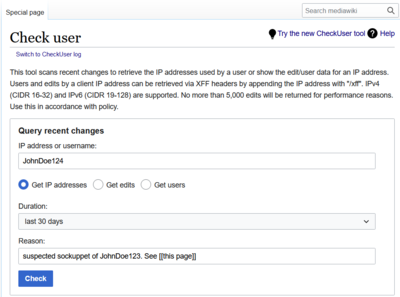 Basic CheckUser interface
 -
 Example username check
 -
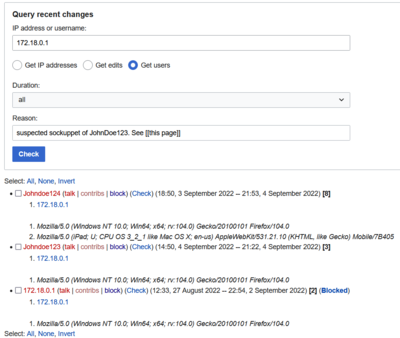 Example IP check
 -
 Example Get edits check
 -
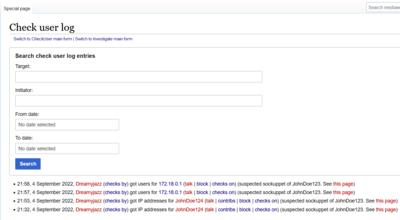 Example log


Information returned
A typical entry in the CheckUser results for a user summary ("get users") is as follows:
- Example (talk | contribs | block) (Check) (20:11, 18 January 2026 -- 20:12, 18 January 2026) [5]
- 127.0.0.37 XFF: 127.0.0.1, 127.0.0.5
- Example user agent
This is formatted to fit a lot of information into a format that can very easily be listed and skimmed, but is difficult to read unless you know what the information provided is. The information is laid out as follows:
- username (user links) (time period when they edited from the given IP or range) [number of edits from the IP or range]
- IP address edited from XFF: XFF information provided (can be spoofed)
Each IP/XFF combination used to edit is listed, in order of use.
The last ten user agents (browser, operating system, system language, and versions) for each user for edits made in the IP or range are listed afterwards.
XFF Format
XFF (X-Forwarded-For) headers indicate the series of IP addresses used from the user's computer (first) to the last proxy server. In case of Wikimedia, the last proxy server is one of the Wikimedia proxies (listed under $wgCdnServersNoPurge in the Wikimedia configuration file).
In this example:
aaa.aaa.aaa.aaa XFF: 10.4.46.42, 127.0.0.1, aaa.aaa.aaa.aaa, 208.80.152.46
- the first two addresses (
10.4.46.42,127.0.0.1) are private to the originating network and can't be reached directly from the public Internet, - the third address (
aaa.aaa.aaa.aaa) is the "public face" of the editor, usually a broadband or dial-up ISP, a company gateway, (but possibly an anonymizer or a malware-compromised server), - the last address (
208.80.152.46) is one of the Wikimedia squids (sq36.wikimedia.org).
MediaWiki configuration settings $wgUsePrivateIPs, $wgCdnServers, $wgCdnServersNoPurge and extensions using the IsTrustedProxy hook (such as Extension:TrustedXFF) change the way an actual IP address used to attribute edits is selected.
Personal tool links
When you get results from Special:CheckUser you can add personal user tool links via the following interface messages:
MediaWiki:checkuser-userlinks-ipfor IP addresses (for example m:MediaWiki:checkuser-userlinks-ip)MediaWiki:Checkuser-userlinksfor registered users (for example m:MediaWiki:Checkuser-userlinks)MediaWiki:checkuser-toollinksfor IPs in the 'Get IP Addresses' check type (for example m:MediaWiki:checkuser-toollinks)MediaWiki:Checkuser-cidr-tool-linksfor IP ranges produced by the CIDR calculator present at the bottom of all Special:CheckUser pages. Interface message added in 1.41.
Special:Investigate usage
Basic usage
- Go to Special:Investigate.
- In the Usernames and IP addresses field, type in up to 10 targets, which may be usernames (without the
User:prefix), IP addresses, or CIDR ranges. - In the Reason field, enter the reason you are accessing the confidential data, as described in the Special:CheckUser instructions above; this will be logged in a log visible only to users with the checkuser-log permission.
- Screenshots
-
 Input form
 -
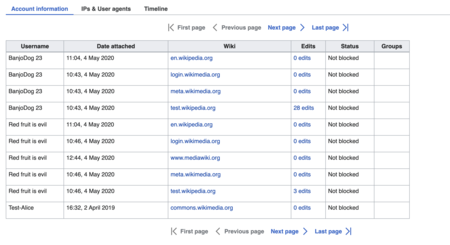 Account information tab
 -
 IPs and user agents tab
 -
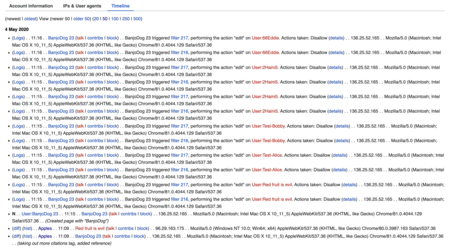 Timeline tab


For advanced feature usage, see Help:Special Investigate.
Customizing tool links
As with Special:CheckUser, links to external tools can be customized.
The links are defined in the checkuser-investigate-compare-toollinks message.
This message is parsed to find links, which are added to the menu in the IPs & User agents tab.
Special:IPContributions usage
This page is only available if temporary accounts are known on a wiki (See MainConfigSchema::AutoCreateTempUser for more information).
It's used to examine the temporary accounts associated with an IP.
To use this page, you must have the right to view IP addresses (checkuser-temporary-account) and have enabled the preference to view IP addresses (on Special:Preferences, under "Temporary account IP reveal").
Basic usage
- Go to Special:IPContributions.
- In the IP address or range: field, input an IP (IPv4 or IPv6) or CIDR range.
- Adjust parameters as necessary and submit a search. This action will be logged to the
checkuser-temporary-accountlog which will be visible to users with thecheckuser-temporary-account-logright.
- Screenshots
-
 Input form
 -
 Example results


Special: GlobalContributions usage
This page is only available if temporary accounts are known on a wiki (See MainConfigSchema::AutoCreateTempUser for more information) and Extension:GlobalPreferences is enabled.
Given a user name (named or temporary), it aggregates recent revisions across all wikis from that user.
Given an IP address, it aggregates recent revisions from temporary accounts across all wikis that the user has the right to see.
(The page does not show contributions from anonymous users whose name is their IP address.)
To view results for an IP address, you must have the right to view IP addresses (checkuser-temporary-account) and have enabled the global preference to view IP addresses (on Special:GlobalPreferences, under "Temporary account IP reveal").
Basic usage
- Go to Special:GlobalContributions
- In the Username, IP address or range: field, input a user name, an IP (IPv4 or IPv6) or CIDR range.
- Adjust parameters as necessary and submit a search. If viewing contributions for temporary accounts using an IP address, this action will be logged to the
checkuser-temporary-accountlog which will be visible to users with thecheckuser-temporary-account-logright. - Alongside local results, results will be returned from other wikis. If viewing contributions for temporary accounts using an IP address, results will be returned from wikis on which you also have the
checkuser-temporary-accountright.
- Screenshots
-
 Input form
 -
 Example results


Showing IPs for temporary accounts
| MediaWiki version: | ≥ 1.40 |

The CheckUser extension will show since MediaWiki 1.40 a button that is displayed next to temporary account user links which allows the revealing of their IP address.
This functionality is available exclusively to users with the checkuser-temporary-account privilege, granting them the ability to view the IP addresses that are linked to temporary accounts.
To access this information, the Enable revealing IP addresses for temporary accounts feature must be enabled on the user's Special:Preferences page.
These buttons will appear wherever user links are shown for a temporary account, such as when viewing page histories or in Special:Contributions. However, these will not be shown on Special:CheckUser, Special:Investigate or Special:InvestigateBlock.
APIs
CheckUser and CheckUserLog API
CheckUser provides an API that allows access to the information shown on Special:CheckUser and Special:CheckUserLog.
These two APIs work fairly similarly to the special pages, but the reason for a check using the checkuser API is prefixed with "API:" to indicate they were made using the API.
Example usages of these APIs are shown below.
- CheckUser API
api.php?action=query&list=checkuser&curequest=userips&cutarget=Jimbo_Wales
api.php?action=query&list=checkuser&curequest=edits&cutarget=127.0.0.1/16&xff=1&cureason=Some_check
- CheckUserLog API
api.php?action=query&list=checkuserlog&culuser=WikiSysop&cullimit=25
api.php?action=query&list=checkuserlog&cultarget=127.0.0.1&culfrom=20111015230000
Temporary Account Reveal API
Template:MW 1.40 Usage
The TemporaryAccountHandler class offers API endpoints for retrieving the IP addresses associated with temporary user accounts. To access this information, the Enable revealing IP addresses for temporary accounts feature must be enabled on the user's Special:Preferences page.
API endpoint
GET /rest.php/checkuser/v0/temporaryaccount/{name} where {name} is the user name you want to look up
Response
If the request is successful, the API will respond with a JSON object containing the following fields:
| Name | Type | Description |
|---|---|---|
ips
|
string[]
|
IPs of the given temporary account |
If the request fails, the API will respond with an appropriate error code and message.
Example request
GET /rest.php/checkuser/v0/temporaryaccount/*Unregistered%202
Example response
{"ips": [ "114.127.69.62" , "212.47.235.82" , "212.47.235.81" ]}
TemporaryAccountRevisionHandler
The TemporaryAccountRevisionHandler class offers API endpoints for viewing the IP associated with a revision for temporary accounts. You can specify one or multiple revision IDs in the query string.
API endpoint
GET /rest.php/checkuser/v0/temporaryaccount/*Unregistered%203/revisions/{revisionId} where {revisionId} is the revision ID(s) you want to look up separated by the | character.
Response
If the request is successful, the API will respond with a JSON object containing the following fields:
| Name | Type | Description |
|---|---|---|
ips
|
dictionary
|
The revision ID as the key and the associated IP address as the value. |
If the request fails, the API will respond with an appropriate error code and message.
Example request
GET /rest.php/checkuser/v0/temporaryaccount/*Unregistered%203/revisions/31
Example response
{"ips":{"31":"40.175.36.227"}}
Example request with multiple revisions
GET /w/rest.php/checkuser/v0/temporaryaccount/*Unregistered%205/revisions/194|193
Example response
{"ips":{"194":"40.175.36.227","193":"1.2.3.4"}}
 | 이 확장은 하나 이상의 위키미디어 프로젝트 또는 다움위키에서 사용되고 있습니다. 이것은 아마도 확장이 안정적이고 높은-트래픽 웹 사이트에서 사용되기에 충분히 잘 작동한다는 것을 의미합니다. 위키미디어의 CommonSettings.php 및 InitialiseSettings.php 구성 파일에서 이 확장의 이름을 찾아 설치 위치를 확인하십시오. 특정 위키에 설치된 확장의 전체 목록은 위키의 Special:Version 페이지에서 볼 수 있습니다. |